 StarCreate
AcheterBuy
StarUI Pro, acheté sur Roblox, en quatre étapesStarUI Pro, bought on Roblox, in four steps
Tout se passe sur le Creator Store officiel de Roblox : pas de compte StarCreate, pas de clé de licence, pas de paiement sur ce site.Everything happens on the official Roblox Creator Store: no StarCreate account, no licence key, no payment on this site.
StarUI Pro Pro
Styles en masse, alignements et piles, composants premium (carte produit, barre de progression, boîte de confirmation), dans Studio et dans l'éditeur web.Bulk styles, alignment and stacks, premium components (product card, progress bar, confirmation dialog), in Studio and in the web editor.
6,99 $ — 4,99 $ au lancement— $4.99 at launch
Achat unique en dollars sur le Creator Store de Roblox, sans abonnement. Nécessite le plugin gratuit StarCreate.One-time purchase in US dollars on the Roblox Creator Store, no subscription. Requires the free StarCreate plugin.
Voir StarUI Pro sur le Creator Store — lien ajouté à la publicationSee StarUI Pro on the Creator Store — link added at launch
Les étapesThe steps
- Installe d'abord le plugin gratuit StarCreate depuis le Creator Store (page Télécharger).First install the free StarCreate plugin from the Creator Store (Download page).
- Ouvre la page de StarUI Pro sur le Creator Store et achète-la avec ton compte Roblox, comme n'importe quel plugin payant.Open the StarUI Pro page on the Creator Store and buy it with your Roblox account, like any paid plugin.
- Dans Roblox Studio, ouvre l'onglet Plugins › Manage Plugins et vérifie que StarUI Pro est activé, puis redémarre Studio.In Roblox Studio, open the Plugins tab › Manage Plugins and make sure StarUI Pro is enabled, then restart Studio.
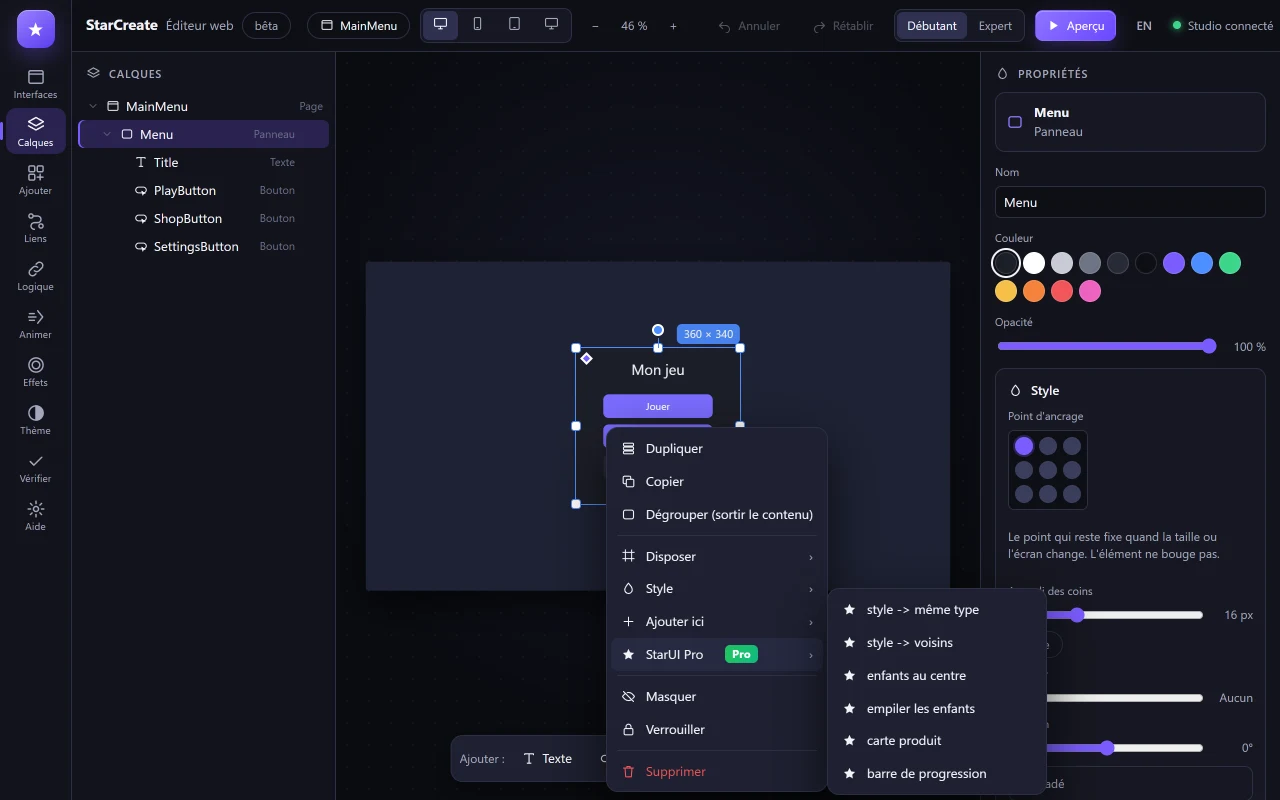
- Dans StarCreate, la marque Pro passe au Pro vert : les outils sont au clic droit, sous « StarUI Pro », dans Studio et dans l'éditeur web.In StarCreate, the Pro mark turns into a green Pro: the tools are on right-click, under "StarUI Pro", in Studio and in the web editor.
Bon à savoirGood to know
PaiementPayment
Géré entièrement par Roblox. StarCreate ne voit jamais tes moyens de paiement.Handled entirely by Roblox. StarCreate never sees your payment details.
RemboursementRefunds
Ce sont les règles du Creator Store de Roblox qui s'appliquent ; vois leur aide en cas de problème.The Roblox Creator Store rules apply; see their help if something goes wrong.
Mises à jourUpdates
Distribuées par Roblox comme pour tout plugin : redémarre Studio pour les recevoir.Delivered by Roblox like any plugin: restart Studio to get them.
Les autres extensionsThe other extensions
StarMotion, StarVFX et StarLogic sont marquées Bientôt : elles ne sont pas encore en vente.StarMotion, StarVFX and StarLogic are marked Coming soon: they are not on sale yet.
Personne de StarCreate ne te demandera jamais de payer par Discord, carte cadeau, PayPal ou Robux en privé. Si on te le demande, c'est une arnaque.Nobody from StarCreate will ever ask you to pay through Discord, gift cards, PayPal or private Robux. If someone does, it is a scam.